
Absher Iqama: Complete Guide to Check, Renew, Verify & Manage Your Saudi Residency Permit (2026)
Absher Iqama is the official online service that helps residents manage their Saudi residency permit through the Absher platform. It gives expatriates, employers, and eligible dependents secure access to important residency services without visiting a government office.
You can use Absher Iqama to check your Iqama validity, renew your residency permit, verify your resident status, update passport information, manage family services, and access visa-related features. Many services also support employers who manage employee residency records.
The platform is operated by the Saudi Ministry of Interior and works with government systems such as Jawazat and Nafath. This integration ensures secure identity verification and reliable access to official digital services.

Whether you want to renew your Iqama, check its expiry date, verify your residency status, or understand the latest requirements, this guide covers every essential topic. You will also learn about eligibility, renewal conditions, common issues, fees, security features, and practical tips to manage your Saudi residency with confidence.
What Is Absher Iqama?
Absher Iqama is an official digital service that helps eligible residents manage their Saudi residency permit online. It allows users to access important residency services through a secure government platform without visiting a service center for many routine tasks.
An Iqama is the official resident identity card issued to foreign nationals who live and work in Saudi Arabia. It serves as proof of legal residency and contains important details such as the resident’s identity, sponsor information, and permit validity.
The Absher platform connects residents with a wide range of digital government services. Users can check Iqama validity, renew eligible residency permits, verify personal information, update passport details, and access visa-related services from one account.
Absher works closely with Jawazat, the General Directorate of Passports. Jawazat manages residency permits, passports, and many immigration services. Many Iqama transactions processed through Absher follow the rules and requirements set by Jawazat.
The platform also operates under the Saudi Ministry of Interior, which oversees national digital services related to security, identity, and residency. This official connection ensures that information remains accurate, secure, and synchronized across government systems.
For secure identity verification, Absher integrates with Nafath. Nafath confirms a user’s identity before allowing access to sensitive government services. This extra layer of protection helps prevent unauthorized access and supports secure online transactions.
Today, Absher Iqama has become an essential tool for residents, employers, and sponsors. It simplifies residency management and reduces the need for in-person visits while keeping users connected to official government services.
Benefits of Using Absher for Iqama Services
Absher makes residency management faster, simpler, and more convenient. Instead of visiting government offices for routine tasks, users can complete many services online at any time.
Access Services Anytime
Absher is available around the clock through its website and mobile app. Users can manage their Iqama from home, work, or while traveling within Saudi Arabia.
Save Time with Faster Processing
Many Absher Iqama services now take only a few minutes to complete. Users can submit requests online and receive updates without waiting in long queues.
Secure Identity Verification
Absher uses advanced security measures to protect user accounts. Integration with Nafath adds secure identity verification, while one-time passwords and account authentication help safeguard personal information.
Easy Access for Employers
Employers can manage eligible employee residency services through authorized business accounts. This helps simplify administrative tasks and supports efficient workforce management.
Convenient Family Services
Residents can access services related to eligible family members and dependents. The platform supports tasks such as checking residency information, managing family records, and completing approved digital services.
Mobile Access Anywhere
The Absher mobile app gives users quick access to essential Iqama services. Residents can check their absher Iqama status, receive important notifications, verify information, and manage services directly from their smartphone.
Reliable Official Information
Because Absher connects directly with the Saudi Ministry of Interior and Jawazat, users receive accurate information from official government records. This reduces errors and helps residents make informed decisions about their residency status.
Who Can Use Absher Iqama?
Absher Iqama serves different user groups across Saudi Arabia. Access to specific services depends on your residency status, account type, and government eligibility requirements.
Residents
Foreign residents with a valid Iqama can use Absher Individuals to manage many residency services. They can check absher Iqama validity, view personal information, update eligible records, access visa services, and monitor important account notifications.
Employers
Employers can use authorized government platforms to manage employee residency services. Depending on the service, employers may complete Iqama renewals, monitor employee records, and fulfill administrative responsibilities required by Saudi regulations.
Sponsors
Sponsors play an important role in many residency processes. They may need to approve or complete certain requests, such as Iqama renewal or residency-related procedures, based on current government rules.
Family Members
Eligible residents can manage approved services for their family members through their Absher account. These services may include viewing dependent information and completing available family-related transactions.
Dependents
Dependents benefit from services linked to the sponsor’s account. Available features depend on eligibility and the type of residency permit issued to each family member.
Companies
Businesses use official government platforms to support workforce management and residency administration. Depending on the service, companies may work with systems such as Absher Business, Qiwa, and Muqeem to complete employee-related procedures.
Always use the account that matches your role. Individual residents should use Absher Individuals, while businesses should use the appropriate government platform for employer services.
How to Register for Absher
Creating an Absher account gives you access to a wide range of official digital government services. Registration is simple when you meet the required conditions.
Registration Requirements
Before you create an account, make sure you have:
- A valid Iqama or Saudi national ID.
- An active mobile number registered in your name.
- A valid email address.
- Internet access to complete the registration process.
- The information required for identity verification.
Your mobile number should not already be linked to another Absher account.
Create Your Absher Account
Follow these steps to register:
- Visit the official Absher website or open the Absher mobile app.
- Select New User.
- Enter your Iqama number or national ID.
- Provide your mobile number and email address.
- Create a strong username and password.
- Accept the terms and conditions.
- Submit your registration request.
Review your information carefully before submitting the form.
Verify Your Identity
After registration, Absher verifies your identity to protect your account. You may receive a one-time password (OTP) on your registered mobile number. Enter the code to continue the verification process.
Activate Your Account
Some services require account activation after registration. You can complete activation through approved channels, such as supported banks or other authorized activation methods provided by the Saudi government.
Identity Verification with Nafath
Some transactions require additional identity confirmation through Nafath. This secure authentication service verifies your identity before you access sensitive government services or approve important requests.
Mobile Number Verification
Your registered mobile number plays a key role in account security. Absher uses it to send verification codes, security alerts, and login confirmations. Keep your number updated to avoid access issues.
How to Log In to Absher
Once your account is active, you can securely access your Iqama services through the Absher website or mobile app.
Login Steps
To sign in:
- Open the official Absher website or mobile app.
- Select Individuals if you are a resident.
- Enter your username or Iqama number.
- Type your password.
- Complete the security verification if prompted.
- Enter the one-time password (OTP) sent to your registered mobile number.
- Access your dashboard.
After logging in, you can manage your Iqama services, review notifications, and use other available government services.
Recover a Forgotten Password
If you forget your password, select Forgot Password on the login page. Follow the identity verification steps and reset your password using your registered mobile number and account information.
Choose a strong password that combines letters, numbers, and special characters.
One-Time Password (OTP)
Absher uses OTP verification to protect your account during login and sensitive transactions. Enter the code promptly because it expires after a short period.
Never share your OTP with anyone.
Secure Authentication
Some actions require additional authentication through Nafath. This process confirms your identity before allowing access to sensitive services, helping protect your personal information from unauthorized use.
Common Login Problems
You may experience login issues for several reasons:
- Incorrect username or password.
- Expired OTP.
- Unregistered or changed mobile number.
- Locked account after multiple failed attempts.
- Temporary system maintenance.
- Internet connection problems.
Check your login details carefully before trying again. If the issue continues, use the official account recovery options or contact Absher support for assistance.
Absher Iqama Dashboard Overview
After you log in, the Absher dashboard gives you quick access to your personal information and government services. The layout may change as new features become available, but the main sections remain easy to navigate.

Profile
The Profile section displays your personal information linked to your Iqama. You can review details such as your full name, resident ID number, nationality, date of birth, and contact information. Always check that your registered mobile number and email address are up to date.
Documents
The Documents section provides access to important residency-related records. Depending on your eligibility, you can view information about your absher Iqama and other official documents connected to your account. This section helps you verify your records before completing government services.
Passport
The Passport menu shows passport information associated with your residency record. You can review your passport details and, where available, update eligible information after renewing your passport. Keeping your passport information current helps prevent delays in residency and visa services.
Visas
The Visas section allows eligible users to access visa-related services. Depending on your status, you can view visa information, check visa validity, and manage services such as Exit Re-Entry Visas and Final Exit Visas.
Family
The Family menu helps residents manage approved services for eligible dependents. You can review family member information, check residency details, and access available family-related government services from one place.
Traffic
The Traffic section provides access to traffic services linked to your account. You can review traffic violations, check outstanding fines, and verify records that may affect certain government transactions, including some residency services.
Payments
The Payments section helps you review payment-related information connected to government services. Some services require payment through approved channels, such as SADAD or supported banking services, before your request can be processed.
Notifications
The Notifications menu keeps you informed about important account activity. You may receive updates about submitted requests, account security, residency services, verification steps, and other government announcements. Review these notifications regularly to avoid missing important updates.
How to Check Iqama Validity
Checking your Iqama validity helps you confirm that your Saudi residency permit remains active. Regular checks also help you avoid unexpected expiration and complete renewals on time.
Steps to Check Iqama Validity
Follow these steps to check your absher Iqama status through Absher:
- Visit the official Absher website or open the Absher mobile app.
- Sign in to your Absher Individuals account.
- Complete the required identity verification.
- Open the dashboard.
- Navigate to the residency or personal information section.
- Select your Iqama details.
- Review your Iqama validity and expiry information.
The displayed information comes directly from official government records.
Understand Your Validity Status
Your account shows the current status of your residency permit. A valid absher Iqama means your residency remains active and you can continue using eligible government services. If your Iqama has expired or requires renewal, you should begin the renewal process as soon as possible to stay compliant with Saudi regulations.
Check the Expiry Date
Your absher Iqama record includes the expiry date of your residency permit. Review this date regularly, especially before international travel, employment procedures, or visa applications. Early renewal helps prevent service interruptions and possible penalties.
Verify Your Resident ID Information
While checking your Iqama, confirm that your Resident ID information matches your official records. Verify your name, Iqama number, passport details, and other personal information. If you notice any discrepancies, contact the appropriate authority or your employer to resolve them before requesting additional services.
How to Check Iqama Expiry
Knowing your Iqama expiry date helps you maintain legal residency in Saudi Arabia. It also helps you avoid service interruptions, travel issues, and renewal delays.
Check Your Iqama Expiry Date
You can view your Iqama expiry date through your Absher account in a few simple steps.
- Open the official Absher website or mobile app.
- Sign in to your Absher Individuals account.
- Complete the required identity verification.
- Go to your residency or personal information section.
- Open your Iqama details.
- View the expiry date displayed on your residency record.
The expiry date comes directly from official government records. Review it regularly, especially before travel, job changes, or visa applications.
What Happens If Your Iqama Expires?
An expired absher Iqama means your residency permit is no longer valid. This may affect your access to government services, employment procedures, banking services, and travel-related transactions.
In many cases, your employer or sponsor must complete the renewal process before or shortly after the expiry date. Delayed renewal may result in penalties or other administrative actions under Saudi regulations.
If you notice that your Iqama has expired, contact your employer or sponsor immediately and begin the renewal process as soon as possible.
Understand the Renewal Timeline
Do not wait until the last day to renew your absher Iqama. Start preparing well before the expiry date.
Before renewal, make sure the required conditions are met, including:
- Your passport remains valid.
- Required government fees are paid.
- Medical insurance is active, when required.
- Your work permit meets applicable requirements.
- Outstanding obligations that affect renewal have been resolved.
Planning ahead helps you avoid unnecessary delays and keeps your residency status active.
How to Check Iqama Status
Your Iqama status shows the current condition of your Saudi residency permit. Checking it regularly helps you confirm that your residency record remains valid and that no action is required.

Steps to Check Your Iqama Status
Follow these steps to view your residency status:
- Log in to your Absher Individuals account.
- Complete the security verification.
- Open your dashboard.
- Go to the residency or personal information section.
- Select your Iqama record.
- Review the current status shown on the screen.
The status displayed reflects the latest information available in the official government system.
Active
An Active status means your absher Iqama is valid and your residency remains in good standing. You can continue using eligible government services, subject to applicable regulations.
Pending
A Pending status usually indicates that a request is under review. This may relate to an Iqama renewal, passport update, or another residency service. Wait for the review to finish before submitting another request for the same service.
Expired
An Expired status means your residency permit has reached its expiry date and requires renewal. Contact your employer or sponsor promptly to begin the renewal process and restore your active status.
Suspended
A Suspended status indicates that your absher Iqama is temporarily restricted. This may happen when certain renewal requirements remain incomplete or another issue requires attention. Review your account notifications and work with your employer or the appropriate authority to resolve the issue.
Cancelled
A Cancelled status means your residency permit is no longer valid. This can occur after approved government procedures, such as a final exit or other authorized residency actions. If you believe the status is incorrect, contact your employer or the relevant government authority for guidance.
Why You Should Check Your Status Regularly
Checking your Iqama status takes only a few minutes. Regular checks help you:
- Confirm your residency remains valid.
- Identify renewal needs early.
- Monitor pending requests.
- Avoid delays in government services.
- Stay informed about changes to your residency record.
Making this a regular habit helps you maintain uninterrupted access to essential services throughout your stay in Saudi Arabia.
How to Renew Iqama Through Absher
Renewing your absher Iqama keeps your residency permit valid and ensures uninterrupted access to government services. In most employment cases, the renewal process starts with your employer or sponsor through Absher Business or another approved government platform. Employees can track the renewal status through their Absher Individuals account.
Step 1: Check Your Iqama Expiry Date
Sign in to your Absher account and review your absher Iqama validity. Start the renewal process before your residency permit expires. Early preparation helps prevent delays and penalties.
Step 2: Confirm the Renewal Requirements
Before renewal begins, make sure all required conditions are met. The most common requirements include:
- A valid passport.
- Active medical insurance.
- A valid work permit for eligible workers.
- Payment of the required renewal fees.
- No unpaid traffic violations.
- Updated biometric registration, where required.
Step 3: Employer or Sponsor Starts the Renewal
For most expatriate workers, the employer or sponsor submits the renewal request through Absher Business or another authorized government platform. Employees cannot complete this step themselves.
Step 4: Pay the Required Fees
The renewal request moves forward after the required government fees are paid through approved payment channels. Payment confirmation must appear in the government system before the renewal can be completed.
Step 5: Verify Passport Validity
Your passport must remain valid during the renewal process. If your passport has expired, renew it first and update the passport details before requesting absher Iqama renewal.
Step 6: Confirm Medical Insurance
An active health insurance policy is required for eligible residents. The government system checks the insurance status electronically before processing the renewal request.
Step 7: Verify the Work Permit
For expatriate employees, the work permit must remain valid. An expired work permit can delay or block the Iqama renewal process until it is renewed.
Step 8: Track Your Renewal Status
After submission, log in to your Absher Individuals account to monitor your renewal status. Once approved, your updated Iqama information appears in your account, and your digital residency record reflects the new validity period.
Iqama Renewal Requirement
The following table summarizes the main conditions for renewing an Iqama through the official Saudi government system.
| Requirement | Who Needs It | Mandatory? | Official Source |
|---|---|---|---|
| Valid passport | All eligible residents | ✅ Yes | Saudi Ministry of Interior / Absher User Guide |
| Active medical insurance | Eligible residents and covered dependents | ✅ Yes | Saudi Ministry of Interior / Absher User Guide |
| Valid work permit | Expatriate employees | ✅ Yes | Saudi Ministry of Interior / Absher User Guide |
| Payment of Iqama renewal fees | Applicant or responsible employer/sponsor | ✅ Yes | Saudi Ministry of Interior / Absher User Guide |
| No unpaid traffic violations | Resident whose Iqama is being renewed | ✅ Yes | Saudi Ministry of Interior / Absher User Guide |
| Fingerprint and biometric registration, where required | Eligible residents and qualifying family members | ✅ Yes | Saudi Ministry of Interior / Absher User Guide |
| Employer or sponsor approval | Sponsored expatriate workers | ✅ Yes | Saudi Ministry of Interior / Absher User Guide |
| Separate passport for each eligible family member | Family members included in the renewal | ✅ Yes | Saudi Ministry of Interior / Absher User Guide |
The Saudi Ministry of Interior, Jawazat, and the official Absher platform may update renewal requirements from time to time. Always review the latest official guidance before submitting your renewal request.
Iqama Renewal Fees
The cost of Iqama renewal depends on your residency category and the services linked to your permit. The Saudi government determines these fees, and the total amount may vary based on your employment type, renewal period, and dependent status. The exact amount appears when the renewal request is generated through the official government system.
Government Fees
The standard government fee applies to the renewal of the resident’s Iqama. Some professions or sectors may have different fee structures. Your employer or sponsor can view the exact amount before submitting the renewal request.
The renewal cannot proceed until the required government fee has been paid through an approved payment channel.
Dependent Fees
Residents who sponsor family members may also need to pay fees related to eligible dependents. These charges vary based on current Saudi government regulations and the number of dependents under sponsorship.
If dependent-related fees remain unpaid, the government system may prevent the renewal process from continuing. Always verify the latest amount before making a payment because fee policies can change.
Payment Methods
Saudi Arabia provides several secure payment options for Iqama renewal. The most common methods include:
- SADAD payment system
- Mobile banking apps
- Online banking portals
- Bank ATMs that support government payments
Most payments appear in the government system within a short time after successful processing.
SADAD Payment System
SADAD is the official electronic payment system used for many government services in Saudi Arabia. It allows residents, employers, and sponsors to pay absher Iqama renewal fees securely through participating banks.
Once the payment is confirmed, the government system updates the transaction automatically. Your employer or sponsor can then complete the remaining renewal steps.
How to Pay Iqama Fees
Paying your Iqama renewal fee is simple when you use an approved banking channel. In most cases, the employer or sponsor completes the payment before submitting the renewal request.
Pay Through SADAD
SADAD is the preferred payment method for Iqama services.
Follow these steps:
- Sign in to your online banking account or mobile banking app.
- Open the Government Payments section.
- Select Resident Services or the equivalent option provided by your bank.
- Choose Iqama Renewal.
- Enter the required Iqama or bill information.
- Review the amount shown by the system.
- Confirm the payment.
After successful payment, the bank sends the transaction to the government system for verification.
Pay Using Bank Apps
Most Saudi banks support Iqama fee payments through their mobile applications.
The general process is similar across banks:
- Log in to your banking app.
- Open Government Payments.
- Select the appropriate residency service.
- Enter the required details.
- Confirm the payment.
Keep the payment confirmation until the renewal process is complete.
Pay Through Online Banking
You can also pay through your bank’s online portal using a computer.
Simply:
- Sign in to your internet banking account.
- Navigate to Government Payments.
- Choose the Iqama renewal service.
- Enter the requested information.
- Complete the payment.
After the payment is verified, your employer or sponsor can continue the Iqama renewal through the official government platform.
Verify Your Payment
After paying the fee, check that the payment has been processed successfully before expecting the renewal to complete. Payment confirmation usually appears automatically in the government system, allowing the renewal request to move forward without additional action.
Family Iqama Services
Absher Iqama makes it easier for eligible residents to manage family-related residency services online. Many services help sponsors maintain accurate records and complete official procedures without visiting a government office.
The services available depend on your residency status, sponsorship, and current Saudi government regulations.
Services for Dependents
Residents can view important information about their registered dependents through their Absher account. This includes residency details, Iqama validity, and other approved government records.
Keeping dependent information accurate helps prevent delays when using residency or visa services.
Services for Children
Parents can access residency information for eligible children under their sponsorship. Depending on the available service, they may:
- Check Iqama validity.
- Review residency records.
- Monitor renewal status.
- Access approved government services.
Parents should review their children’s Iqama expiry dates regularly to avoid interruptions in residency status.
Services for a Spouse
Eligible sponsors can manage certain residency services for their spouse through Absher. Available services may include:
- Viewing residency information.
- Checking Iqama validity.
- Monitoring renewal status.
- Accessing approved visa-related services.
The services shown depend on the spouse’s residency record and current eligibility.
Family Sponsorship
Family sponsorship allows eligible residents to sponsor qualified family members under Saudi immigration rules.
Sponsors should ensure that:
- Family Iqamas remain valid.
- Passport information stays current.
- Medical insurance meets renewal requirements.
- Government fees are paid on time.
- Required documents remain accurate.
Managing these tasks early helps avoid delays during Iqama renewal or visa processing.
Best Practices for Family Iqama Management
To keep your family’s residency records up to date:
- Check every family member’s Iqama regularly.
- Renew residency before the expiry date.
- Update passport information after renewal.
- Maintain active medical insurance.
- Review account notifications for important updates.
Regular account checks help families maintain uninterrupted access to government services.
Employer Services
Employers play an important role in managing employee residency in Saudi Arabia. The Saudi government provides dedicated digital platforms that simplify workforce administration and help businesses meet legal requirements.
Depending on the service, employers may use Absher Business, Muqeem, and Qiwa to complete employee-related procedures.
Company Users
Authorized company representatives can access official business accounts to manage employee residency records. These accounts provide secure access to approved government services while protecting employee information.
Business users should ensure that only authorized personnel manage company accounts.
Employee Iqama Renewal
For most expatriate employees, the employer or sponsor completes the Iqama renewal process.
Before submitting the request, employers should verify that:
- The employee’s passport is valid.
- Medical insurance is active.
- The work permit remains valid.
- Government renewal fees have been paid.
- Required conditions under Saudi regulations have been met.
Once the renewal is approved, employees can view their updated absher Iqama information through their Absher Individuals account.
Employee Transfers
Saudi Arabia allows eligible employee transfers under specific government regulations.
During a transfer, employers may need to complete approved procedures through official government platforms. The exact process depends on the employee’s residency status, sponsorship, and current labor regulations.
Both the previous and new employer should ensure that all required documents remain accurate throughout the transfer process.
Business Accounts
Absher Business provides organizations with secure access to government services designed for employers.
Business accounts help companies:
- Manage employee residency records.
- Complete approved Iqama services.
- Monitor government transactions.
- Track service requests.
- Improve administrative efficiency.
Large organizations often use Muqeem for residency management and Qiwa for labor-related services alongside Absher Business. Together, these official platforms help employers manage their workforce while complying with Saudi regulations.
Employer Responsibilities
Employers should review employee residency records on a regular basis. Timely renewals, accurate documentation, and prompt fee payments help maintain legal compliance and reduce delays in government services. Consistent record management also supports a smooth experience for both employers and employees.
Passport Services
Keeping your passport information up to date is essential for maintaining a valid Iqama. Many residency and visa services depend on accurate passport records. If your passport expires or contains incorrect information, it may delay absher Iqama renewal or other government transactions.
Update Passport Information
If you renew your passport, update your passport details in the official government system as soon as possible. Accurate records help prevent issues during Iqama renewal, visa processing, and identity verification.
Before requesting an update, make sure:
- Your new passport is valid.
- Your personal information matches your residency records.
- The passport number and expiry date are correct.
Depending on your residency status, the update may be completed by your employer, sponsor, or through an available government service.
Check Passport Expiry
Review your passport expiry date regularly. A passport with limited validity can affect several government services, including:
- Iqama renewal.
- Exit Re-Entry Visa issuance.
- Final Exit procedures.
- Residency updates.
Renew your passport well before it expires to avoid delays in future applications.
Verify Your Documents
Always verify your passport and residency information before submitting any request.
Check that your:
- Full name matches official records.
- Passport number is correct.
- Nationality is accurate.
- Date of birth is correct.
- Passport expiry date is current.
Accurate documents reduce processing delays and improve the success of government transactions.
Related Visa Services
Absher provides access to several visa-related services that work alongside your Iqama. These services help residents and sponsors manage travel and residency while following Saudi immigration regulations.
Exit Re-Entry Visa
An Exit Re-Entry Visa allows eligible residents to leave Saudi Arabia and return before the visa expires.
Through official government services, eligible users can:
- Apply for an Exit Re-Entry Visa.
- Check visa validity.
- View visa details.
- Monitor visa status.
Always confirm your visa validity before making travel plans.
Final Exit Visa
A Final Exit Visa allows a resident to leave Saudi Arabia permanently after completing the required government procedures.
Before a Final Exit Visa is issued, make sure:
- Your residency requirements are complete.
- Required approvals have been obtained.
- Outstanding obligations have been resolved.
Once the visa is used, your Iqama is no longer valid.
Check Visa Validity
Checking your visa validity helps you confirm that your travel authorization remains active.
Your visa record typically displays:
- Visa type.
- Issue date.
- Expiry date.
- Current status.
Review this information before booking international travel.
Visa Extension
Some visa categories may qualify for an extension under Saudi government regulations.
Eligibility depends on several factors, including:
- Visa type.
- Residency status.
- Government requirements.
Check the latest official guidance before requesting a visa extension.
Visa Cancellation
Certain situations require visa cancellation before a new request can be submitted.
Visa cancellation may apply when:
- Travel plans change.
- A visa was issued by mistake.
- A different visa service is required.
Always complete cancellations through official government channels to keep your residency record accurate.
Absher Mobile App for Iqama
The Absher App lets residents access essential Iqama services from their smartphone. It offers a secure and convenient way to manage residency records without using a computer.
The app is available for both Android and iPhone devices and supports many of the services offered through the Absher website.
Android
Android users can install the official Absher App from the Google Play Store.
After signing in, you can:
- Check Iqama validity.
- View your residency information.
- Access visa services.
- Review passport details.
- Receive account notifications.
Always download the app from the official store to protect your account.
iPhone
iPhone users can download the official Absher App from the Apple App Store.
The iOS version provides access to many of the same government services, allowing you to manage your residency securely from anywhere.
Keep the app updated to receive the latest security improvements and new features.
Notifications
The Absher App sends important notifications directly to your device.
These alerts may include:
- Iqama renewal updates.
- Visa status changes.
- Security verification requests.
- Account activity.
- Government service announcements.
Enable notifications so you do not miss important updates about your residency.
Access Digital Government Services
The mobile app brings many official digital services into one place.
Eligible users can:
- Check Iqama status.
- Verify residency information.
- Access approved visa services.
- Monitor service requests.
- Review personal records.
- Complete eligible government transactions.
Using the Absher App helps residents stay informed and manage their Saudi residency quickly, securely, and conveniently.

Common Errors & Troubleshooting
Most Absher Iqama issues have simple solutions. Identifying the cause early can save time and prevent delays in residency services.
Verification Failed
A verification error usually appears when the information entered does not match official government records.
Try these steps:
- Check your Iqama number carefully.
- Verify your date of birth and personal details.
- Make sure you use your registered mobile number.
- Complete all required verification steps.
If the problem continues, contact your employer or the official Absher services support channels.
OTP Issues
Absher sends a One-Time Password (OTP) to your registered mobile number during login and sensitive transactions.
If you do not receive the OTP:
- Confirm that your mobile number is correct.
- Check your mobile network signal.
- Wait a few minutes before requesting another code.
- Do not request multiple OTPs within a short period.
Never share your OTP with anyone.
Login Failed
Login problems often result from incorrect account details or temporary security restrictions.
Check the following:
- Username or Iqama number.
- Password.
- Internet connection.
- Browser or app version.
If you forget your password, use the official Forgot Password option to reset it securely.
Iqama Not Found
If your Iqama record does not appear, it may be due to:
- Incorrect Iqama number.
- A recently submitted government request.
- Data synchronization delays.
- Account-related issues.
Verify your information first. If the issue remains, contact your employer, sponsor, or the appropriate government authority.
Iqama Renewal Rejected
An absher Iqama renewal request may be rejected if one or more requirements remain incomplete.
Common reasons include:
- Expired passport.
- Inactive medical insurance.
- Invalid work permit.
- Unpaid government fees.
- Outstanding traffic violations.
Resolve the issue before submitting another renewal request.
System Unavailable
Sometimes Absher may be temporarily unavailable because of scheduled maintenance or technical updates.
If this happens:
- Wait a short time before trying again.
- Check your internet connection.
- Use the official mobile app if the website is unavailable.
- Avoid submitting the same request multiple times.
Most temporary issues resolve once maintenance is complete.
Security Features
Absher protects your personal information through multiple layers of security. These features help prevent unauthorized access and keep government transactions secure.
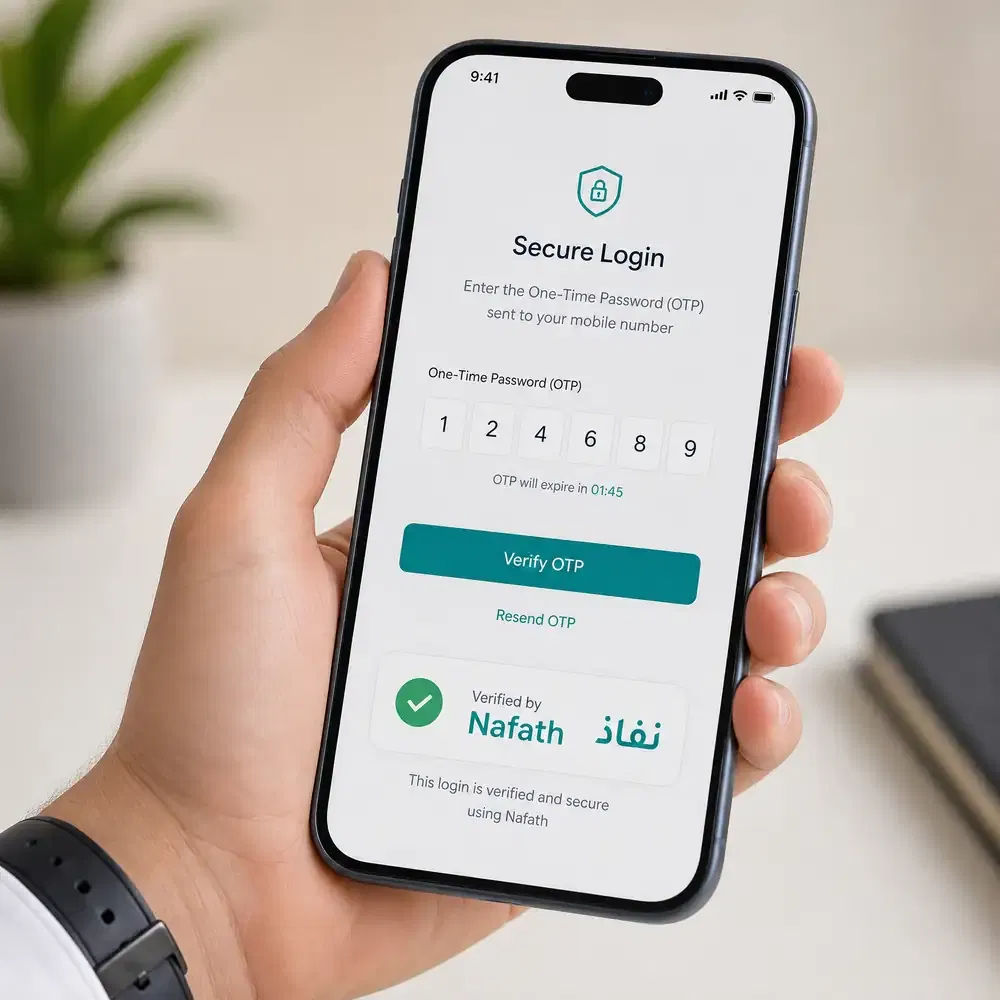
Nafath Integration
Nafath provides secure digital identity verification for many government services.
Before completing sensitive transactions, Nafath confirms that you are the authorized account holder. This extra verification helps protect your residency information and reduces identity fraud.
One-Time Password (OTP)
Absher uses an OTP during login and important account activities.
Each code is valid for a limited time and works only once. This makes it much harder for unauthorized users to access your account.
Always enter the OTP promptly and never share it with anyone.
Two-Factor Authentication
Absher combines your password with mobile verification to strengthen account security.
Even if someone knows your password, they cannot access your account without completing the second verification step.
This additional protection helps keep your personal information safe.
Identity Verification
Some government services require additional identity checks before they can be completed.
Identity verification helps ensure that:
- The correct person submits the request.
- Sensitive information stays protected.
- Government records remain accurate.
This process also helps reduce errors and unauthorized account activity.
Fraud Prevention
Absher uses several security measures to protect users from fraud.
Follow these best practices:
- Create a strong password.
- Keep your login credentials private.
- Never share your OTP.
- Use only the official Absher website or mobile app.
- Review account notifications regularly.
- Update your contact information when it changes.
Taking these simple steps helps protect your account and your Saudi residency records.
Common Mistakes to Avoid
Small mistakes can delay your Iqama renewal or interrupt access to government services. Avoiding these common issues makes the process much smoother.
Letting Your Passport Expire
A valid passport is one of the key requirements for many residency services.
Renew your passport before it expires and update your passport information in the government system without delay.
Waiting Too Long to Renew Your Iqama
Do not wait until the last moment to start the renewal process.
Check your Iqama expiry date regularly and begin preparing well in advance. Early action helps you avoid penalties and processing delays.
Using the Wrong Mobile Number
Your registered mobile number receives:
- OTP verification codes.
- Security alerts.
- Account notifications.
If your number changes, update it immediately to avoid login and verification problems.
Ignoring Outstanding Traffic Violations
Outstanding traffic violations may prevent certain residency services, including Iqama renewal.
Review your traffic record regularly and settle eligible fines before starting the renewal process.
Overlooking Medical Insurance
Active medical insurance is required for many Iqama renewals.
Before submitting a renewal request, confirm that your insurance remains valid and appears correctly in the government system.
Not Reviewing Your Personal Information
Incorrect personal information can delay government services.
Before submitting any request, verify your:
- Iqama number.
- Passport details.
- Mobile number.
- Email address.
- Personal information.
Keeping your records accurate reduces processing time and helps prevent unnecessary complications.
Tips for Managing Your Iqama Efficiently
Managing your Iqama proactively helps you avoid delays, penalties, and service interruptions. A few simple habits can keep your residency record accurate and up to date throughout the year.
Renew Your Iqama Early
Do not wait until your absher Iqama is about to expire. Start preparing for renewal well in advance.
Early renewal gives you enough time to:
- Complete the required documents.
- Resolve any pending issues.
- Pay government fees.
- Avoid last-minute delays.
If your employer or sponsor handles the renewal, remind them before the expiry date approaches.
Enable Account Notifications
Turn on notifications in the Absher App and keep your registered mobile number active.
Notifications help you receive updates about:
- Iqama renewal status.
- Visa services.
- Account security.
- Government announcements.
- Verification requests.
Checking these alerts regularly helps you respond quickly when action is required.
Verify Your Passport Information
Your passport details should always match your government records.
After renewing your passport:
- Update your passport information promptly.
- Check that your passport number is correct.
- Confirm the new expiry date appears in your records.
Keeping your passport information current helps prevent delays during Iqama renewal and visa services.
Check Your Iqama Validity Every Month
Make it a habit to review your Iqama status at least once each month.
Regular checks help you:
- Monitor your residency validity.
- Track the expiry date.
- Confirm your information remains accurate.
- Identify issues before they affect government services.
Monthly reviews take only a few minutes and can help you avoid unexpected problems.
Keep Your Personal Information Updated
Review your account information regularly.
Make sure your:
- Mobile number is active.
- Email address is current.
- Passport information is accurate.
- Family records remain up to date.
Accurate information allows you to receive important notifications and complete government services without unnecessary delays.
Use Only Official Government Platforms
Always access residency services through the official Absher website, the official Absher App, or other authorized Saudi government platforms.
Avoid unofficial websites that request your personal information or login credentials. Using trusted government platforms protects your account and reduces the risk of fraud.
Latest Rules & Updates
Saudi residency regulations and digital government services continue to evolve. The Saudi Ministry of Interior, Jawazat, and other government authorities may update eligibility requirements, renewal conditions, service procedures, fees, or digital features to improve security and efficiency.
Before renewing your Iqama or submitting any residency-related request, review the latest requirements through the official government platforms. This helps you avoid delays caused by outdated information and ensures your application follows current regulations.
Pay particular attention to updates related to:
- Iqama renewal requirements.
- Government fees.
- Medical insurance requirements.
- Passport validity.
- Work permit conditions.
- Exit Re-Entry Visa rules.
- Final Exit procedures.
- Identity verification through Nafath.
- New digital services introduced on Absher.
Government policies can change without notice. Always rely on official announcements from the Saudi Ministry of Interior, Jawazat, and the official Absher platform before making important residency or immigration decisions. Using current official information helps you complete your transactions correctly and maintain compliance with Saudi regulations.
Frequently Asked Questions
What is an Iqama?
An Iqama is the official Saudi residency permit issued to eligible foreign residents. It proves your legal right to live and work in Saudi Arabia.
What is Absher Iqama?
Absher Iqama refers to the residency services available through the official Absher platform. These services include Iqama renewal, validity checks, passport updates, and visa management.
Who can use Absher Iqama?
Eligible residents, sponsors, employers, and authorized users can access absher Iqama-related services based on their account type and government eligibility.
How do I register for Absher?
Visit the official Absher website or app, select New User, enter your Iqama number, verify your mobile number, and complete the account activation process.
How do I activate my Absher account?
You can activate your account through approved banking channels or other official activation methods supported by the Saudi government.
6. How do I log in to Absher?
Open the official Absher website or app, enter your username and password, complete the security verification, and enter the OTP sent to your registered mobile number.
How do I check my Iqama validity?
Log in to your Absher account, open your residency information, and view your Iqama validity and expiry date.
How do I check my Iqama expiry date?
Sign in to Absher, open your Iqama details, and review the expiry date displayed in your residency record.
How do I know if my Iqama is active?
Your Absher dashboard displays your current Iqama status. If it shows Active, your residency permit remains valid.
How do I renew my Iqama?
In most cases, your employer or sponsor submits the renewal request after all government requirements are met and the required fees are paid.
Can I renew my Iqama online?
Yes. Eligible Iqama renewals are completed through official Saudi government platforms such as Absher Business or other authorized systems.
Who renews the Iqama?
For most expatriate employees, the employer or sponsor completes the Iqama renewal process.
Can I renew my Iqama before it expires?
Yes. Early renewal helps prevent penalties and avoids interruptions to government services.
What documents are required for Iqama renewal?
Requirements generally include a valid passport, active medical insurance, a valid work permit where applicable, payment of government fees, and compliance with current Saudi regulations.
How much is the Iqama renewal fee?
The fee depends on your residency category and current Saudi government regulations. Check the official government system for the latest amount.
How do I pay Iqama renewal fees?
You can pay through SADAD, supported bank apps, online banking, or other approved payment channels.
What happens if my Iqama expires?
An expired Iqama may affect government services, employment procedures, and travel. Contact your employer or sponsor to begin the renewal process as soon as possible.
How long does Iqama renewal take?
Processing time varies depending on your eligibility, document verification, and successful payment of all required fees.
Can employers renew an employee’s Iqama?
Yes. Employers usually manage employee Iqama renewals through official business government platforms.
Can dependents use Absher?
Eligible dependents receive services through their sponsor’s account, while available features depend on government rules and residency status.
How do I check my dependent’s Iqama?
Sponsors can sign in to their Absher account and access the Family section to view eligible dependent information.
How do I update my passport information?
Renew your passport first, then update the passport details through the appropriate official government process.
Conclusion
Absher Iqama is the official platform for managing Saudi residency services online. It allows eligible residents, employers, and sponsors to check Iqama validity, renew residency permits, update passport information, manage visa services, and access family-related features through secure digital government services.
Using Absher saves time, improves convenience, and provides direct access to official information from the Saudi Ministry of Interior. Features such as Nafath identity verification, secure authentication, and mobile access make residency management simple and reliable.
To avoid delays, review yourabsher Iqama status regularly, renew your residency before it expires, keep your passport and personal information updated, and complete all required payments on time. Always use the official Absher platform and follow the latest guidance issued by the Saudi government to ensure your residency records remain accurate and compliant.