
Saudi Absher: Complete Guide to Login, Registration, App & Government Services (2026)
Saudi Absher is the Kingdom’s official digital platform for government services. It helps people complete essential tasks online without visiting government offices. The platform connects users to hundreds of secure services through a single account.
Saudi citizens and residents with a valid Iqama can use Saudi Absher to manage many government services. Eligible visitors can also access selected services when available. The platform supports individuals, employers, and business users, making daily government transactions faster and easier.
With Saudi Absher, you can renew your Iqama, check visa status, apply for exit and re-entry visas, renew passports, manage driving license services, pay traffic fines, book government appointments, update personal information, and verify your identity. Many services also integrate with Nafath, Saudi Arabia’s national digital identity system, to provide secure authentication.
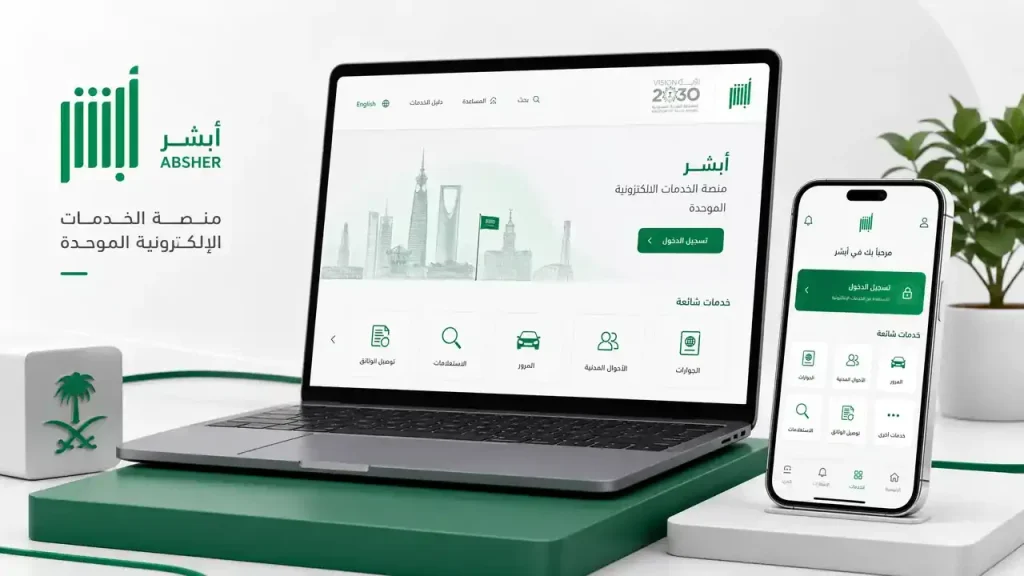
Millions of people trust Saudi Absher because it offers convenient access to government services around the clock. The platform reduces paperwork, saves time, improves security, and keeps important records in one place. Users can complete many tasks in minutes from a computer or the official mobile app.
This guide explains everything you need to know about Saudi Absher. You will learn how to register, log in, manage your account, use the mobile app, access government services, solve common issues, and protect your account. Whether you are a Saudi citizen, an expatriate, or a new resident, this guide will help you use Saudi Absher with confidence.
What Is Saudi Absher?
Saudi Absher is the official online platform of the Ministry of Interior (MOI) in Saudi Arabia. It gives citizens and residents secure access to hundreds of government services through one digital account. Users can complete important tasks online without visiting government offices.
The Ministry of Interior launched Absher in 2010 as part of Saudi Arabia’s digital transformation journey. The platform has grown from a few online services into one of the Kingdom’s largest e-government systems. Today, millions of users rely on Saudi Absher to manage daily government transactions quickly and securely.
Saudi Absher supports the goals of Saudi Vision 2030 by making public services faster, smarter, and more accessible. The platform reduces paperwork, shortens processing times, and improves the overall user experience. It also helps government agencies deliver services more efficiently through digital channels.
As the official Ministry of Interior platform, Saudi Absher connects users with essential government services. These include Iqama management, passport services, visa applications, driving license services, traffic inquiries, vehicle services, family services, and appointment booking. Users can access these services from a computer or the official mobile app at any time.
Saudi Absher also works with Nafath, Saudi Arabia’s national digital identity platform. Nafath verifies a user’s identity through secure authentication before granting access to selected government services. This integration strengthens account security and protects personal information from unauthorized access.
The platform serves a wide range of users across the Kingdom. Saudi citizens can manage personal and family services. Residents with a valid Iqama can complete many immigration and residency tasks. Employers can manage services related to domestic workers and employees. Eligible business users can also access services designed for organizations through dedicated Absher portals.
Unlike unofficial websites, Saudi Absher is the official government platform for Ministry of Interior digital services. Users should always access Absher through its official website or the official mobile application. This helps protect personal information and ensures access to accurate and up-to-date government services.
Key Features of Saudi Absher
Saudi Absher combines digital identity, government services, and secure online transactions into one easy-to-use platform. Its features help users complete important tasks faster while maintaining high security standards.
Digital Identity Integration
Saudi Absher uses secure identity verification to protect every account. Integration with Nafath allows users to verify their identity when accessing sensitive government services. This process adds an extra layer of security and helps prevent unauthorized access.
Access to Hundreds of Government Services
Users can complete many government services from one account. Popular services include:
- Iqama renewal and status checks
- Exit and re-entry visa services
- Final exit visa requests
- Passport renewal and inquiries
- Driving license renewal
- Traffic violation inquiries
- Vehicle registration services
- Family and dependent services
- National address updates
- Government fee payments
This centralized approach saves time and reduces the need for office visits.
Mobile Access Anytime
Saudi Absher is available through its official mobile app for Android and iPhone devices. Users can access their accounts, complete transactions, and receive updates from almost anywhere. The app provides a consistent experience across mobile devices and desktop browsers.
Strong Security and Account Protection
Security remains one of Saudi Absher’s strongest features. The platform protects user accounts with:
- Secure username and password authentication
- One-Time Password (OTP) verification
- Nafath identity verification for supported services
- Encrypted data transmission
- Account activity monitoring
These measures help keep personal information safe.
Fast Online Transactions
Saudi Absher allows users to complete many services entirely online. Applications, renewals, status checks, and payments often take only a few minutes. Digital processing reduces paperwork and speeds up government procedures.
Appointment Booking
Users can schedule appointments with government departments directly through the platform when required. Available appointment services may include:
- Jawazat
- Traffic departments
- Civil Affairs
- Passport offices
Online booking helps reduce waiting times and improves service efficiency.
Instant Notifications
Saudi Absher sends notifications about important account activity and government transactions. Users can receive updates for:
- Application status
- Visa changes
- Iqama expiration reminders
- Appointment confirmations
- Security alerts
- Account verification requests
These notifications help users stay informed and avoid missing important deadlines.
Digital Document Management
Saudi Absher stores important account information and transaction records in one secure location. Users can review service history, monitor application progress, and access digital records whenever needed. This improves organization and makes future transactions easier.
Together, these features make Saudi Absher one of Saudi Arabia’s most important digital government platforms. It simplifies everyday government services while providing a secure, reliable, and user-friendly experience.
Who Can Use Saudi Absher?
Saudi Absher serves a wide range of users across Saudi Arabia. The platform supports citizens, residents, employers, and eligible organizations through secure digital services. Access depends on your legal status, identity verification, and the service you need.
Saudi Citizens
Saudi citizens receive full access to most individual services available on Saudi Absher. They can manage personal documents, family records, passports, vehicles, traffic services, and appointments through one secure account.
Common services include:
- Passport renewal
- National ID-related services
- Driving license services
- Traffic violation inquiries
- Vehicle registration
- Family member management
- Appointment booking
- Government notifications
Residents (Iqama Holders)
Foreign residents with a valid Iqama can access many essential government services through Saudi Absher. These services help expatriates manage their residency and daily government transactions online.
Residents commonly use Saudi Absher to:
- Renew an Iqama
- Check Iqama validity
- Apply for Exit and Re-Entry Visas
- Request a Final Exit Visa
- Update contact information
- Check visa status
- Renew a driving license
- Pay traffic fines
- Book government appointments
Many services require your Iqama to remain valid and your mobile number to stay registered.
GCC Nationals
Eligible citizens of Gulf Cooperation Council (GCC) countries may access selected Saudi government services through Saudi Absher when permitted under current regulations. Available services depend on the user’s eligibility and applicable government policies.
Business Users
Businesses can access government services through Absher Business (Absher Aamal). This platform helps organizations manage employee-related services, authorizations, and other approved business transactions.
Business users should use the appropriate business portal instead of the individual platform whenever required.
Employers
Saudi employers can manage services related to their employees through Saudi Absher and connected government systems. Depending on eligibility, employers may complete tasks such as:
- Employee-related requests
- Visa services
- Sponsorship management
- Government approvals
- Status inquiries
Available services depend on current regulations and user permissions.
Domestic Worker Sponsors
Sponsors of domestic workers can use Saudi Absher to complete many household employment services online. These services may include visa requests, residency management, travel permissions, and other authorized transactions.
Digital access reduces paperwork and speeds up routine procedures.
Visitors
Visitors generally have limited access to Saudi Absher. Some digital services may become available when linked to specific visas, government programs, or identity verification requirements. Available features depend on the visitor’s status and current government policies.
Always check the official Saudi Absher platform to confirm service availability for your visa category.
Saudi Absher Eligibility Table
| User Type | Can Register | Available Services |
|---|---|---|
| Saudi Citizens | ✅ Yes | Full individual government services |
| Residents (Iqama Holders) | ✅ Yes | Residency, visas, traffic, driving license, appointments, and more |
| GCC Nationals | ✅ Eligible services only | Selected government services based on eligibility |
| Business Users | ✅ Through Absher Business | Business and employee-related services |
| Employers | ✅ Yes | Employer and sponsorship services |
| Domestic Worker Sponsors | ✅ Yes | Domestic worker management services |
| Visitors | ⚠️ Limited | Selected services where applicable |
Saudi Absher Login
Logging in to Saudi Absher gives you secure access to your government services. The platform uses multiple security layers to protect your identity and personal information.
Login Requirements
Before you sign in, make sure you have:
- A registered Saudi Absher account
- Your username or ID number
- Your password
- Access to your registered mobile number
- A stable internet connection
Some services may also require Nafath identity verification.
Username
Enter your registered username exactly as you created it during account registration. If you cannot remember it, use the account recovery option available on the login page.
Password
Enter your password carefully. Passwords are case-sensitive. Multiple incorrect attempts may temporarily lock your account for security reasons.
Choose a strong password and never share it with anyone.
One-Time Password (OTP)
After entering your login credentials, Saudi Absher may send a One-Time Password (OTP) to your registered mobile number. Enter the code before it expires to complete the login process.
OTP verification helps protect your account from unauthorized access.
Nafath Verification
Some sensitive government services require additional identity verification through Nafath. After selecting the service, follow the verification request in the Nafath app to confirm your identity.
This extra step strengthens account security and protects personal data.
Login Through a Web Browser
You can access Saudi Absher from any supported web browser.
The basic process is simple:
- Open the official Saudi Absher website.
- Select the appropriate portal.
- Enter your username.
- Enter your password.
- Complete OTP verification if requested.
- Access your dashboard.
Always verify that you are using the official website before entering your login details.
Login Using the Mobile App
The official Saudi Absher app offers a fast and secure login experience.
You can:
- Sign in using your account credentials.
- Receive instant notifications.
- Complete government transactions.
- Use biometric authentication if your device supports it.
Keep the app updated to access the latest features and security improvements.
Business Login
Organizations should use Absher Business for company-related services. Business users have a separate login portal designed for employer and organizational transactions.
Always choose the correct portal based on your account type.
Forgot Password
If you forget your password, use the Forgot Password option on the login page.
You may need to verify:
- Your identity
- Registered mobile number
- Username or ID details
- Verification code
After verification, you can create a new password.
Account Recovery
If you lose access to your account, Saudi Absher provides recovery options to restore access securely. Depending on your situation, you may need identity verification, mobile verification, or additional authentication before resetting your credentials.
Always keep your registered mobile number and email address up to date to simplify account recovery.
Common Saudi Absher Login Errors
You may occasionally experience login problems. Most issues have simple solutions.
| Problem | Possible Cause | Solution |
|---|---|---|
| Invalid username or password | Incorrect login details | Verify your credentials and try again. |
| OTP not received | Mobile network delay or outdated phone number | Wait a few minutes and request a new OTP. Confirm your registered mobile number. |
| Account locked | Multiple failed login attempts | Wait for the lock period to end or follow the account recovery process. |
| Nafath verification failed | Authentication not completed | Open the Nafath app and approve the verification request. |
| Login page not loading | Browser or network issue | Refresh the page, clear your browser cache, or try another supported browser. |
| App login failed | Outdated app version | Update the Saudi Absher app and try again. |
If the problem continues, verify your account information and use the official Saudi Absher support channels for further assistance.
Saudi Absher Registration
Creating a Saudi Absher account gives you secure access to hundreds of online government services. The registration process is simple, but you must provide accurate information and complete identity verification.
Who Can Register for Saudi Absher?
You can register for Saudi Absher if you meet the platform’s eligibility requirements.
Eligible users include:
- Saudi citizens
- Residents with a valid Iqama
- Eligible GCC nationals, where applicable
Your identity must match official government records before you can activate your account.
Registration Requirements
Before you begin, prepare the following:
- A valid National ID or Iqama number
- An active mobile number registered in your name
- A valid email address
- A secure password
- Internet access
- Identity verification, if required
Make sure your information matches your official records. Incorrect details may delay registration.
How to Register for Saudi Absher
Follow these steps to create your account:
- Visit the official Saudi Absher website or open the official mobile app.
- Select New User Registration.
- Enter your National ID or Iqama number.
- Create a unique username.
- Create a strong password.
- Confirm your password.
- Enter your mobile number.
- Add your email address.
- Accept the terms and conditions.
- Submit your registration request.
- Enter the verification code sent to your mobile phone.
- Complete the account activation process.
After activation, you can sign in and access available government services.
Register Your Mobile Number
Your mobile number plays an important role in account security.
Saudi Absher uses your registered number to:
- Send One-Time Passwords (OTP)
- Verify your identity
- Deliver security alerts
- Notify you about government transactions
- Support password recovery
Use a mobile number that belongs to you. Do not register a shared or inactive number.
Add a Valid Email Address
Your email helps Saudi Absher send important notifications and account updates. It also supports account recovery if you lose access to your login credentials.
Check your email regularly to avoid missing important messages.
Complete Identity Verification
Saudi Absher verifies your identity before granting full account access. Depending on your registration method and available services, you may need to complete identity verification through approved government channels.
This process protects your account and helps prevent identity fraud.
Activate Your Saudi Absher Account
Registration alone does not activate your account.
After creating your account, complete the required activation method before using government services. Activation confirms your identity and unlocks your account.
Once activated, you can log in and access eligible services immediately.
Verify Your Account
Some services require additional verification before use. Saudi Absher may ask you to confirm your identity through Nafath or other approved verification methods.
Complete every verification request to avoid interruptions while using government services.
Saudi Absher Registration Checklist
Before submitting your registration, confirm that you have:
- ✅ A valid National ID or Iqama
- ✅ A personal mobile number
- ✅ A working email address
- ✅ A strong password
- ✅ Correct personal information
- ✅ Read and accepted the terms and conditions
- ✅ Completed the verification process
- ✅ Finished account activation
Completing this checklist helps prevent registration delays.
Common Registration Mistakes
Many registration problems happen because of simple errors.
Avoid these common mistakes:
- Entering an incorrect Iqama or National ID number
- Using someone else’s mobile number
- Typing the wrong email address
- Creating a weak password
- Skipping account activation
- Ignoring verification requests
- Entering incorrect OTP codes
- Using outdated personal information
Review every detail before submitting your registration request.
Saudi Absher Account Management
Saudi Absher gives users full control over their personal account settings. Keeping your information updated helps protect your account and ensures uninterrupted access to government services.
Update Your Profile
Review your profile regularly to keep your information accurate.
Depending on your account and available services, you can update details such as:
- Contact information
- Communication preferences
- Account settings
- Personal information where permitted
Always keep your profile current to receive important government notifications.
Reset Your Password
If you forget your password or want stronger security, reset it through the official password recovery option.
Create a password that:
- Uses uppercase and lowercase letters
- Includes numbers
- Contains special characters
- Avoids personal information
- Differs from previous passwords
A strong password helps protect your Saudi Absher account.
Change Your Mobile Number
Your mobile number receives OTP codes and security notifications. Update it immediately if you change your phone number.
Using an active number ensures you can:
- Receive verification codes
- Complete secure logins
- Recover your account
- Receive important alerts
Change Your Email Address
Update your email whenever necessary.
A valid email allows Saudi Absher to send:
- Account notifications
- Password reset instructions
- Security alerts
- Service updates
Always use an email account that only you can access.
Manage Security Settings
Saudi Absher includes several security features to protect your account.
Good security practices include:
- Using a strong password
- Never sharing OTP codes
- Logging out after each session on shared devices
- Monitoring account activity
- Updating contact information regularly
These habits reduce the risk of unauthorized access.
Deactivate Your Account
In some situations, users may request account deactivation through the official procedures. Before taking this step, make sure you understand how deactivation may affect your access to government services.
Review the latest official guidance before submitting a deactivation request.
Recover Your Account
If you cannot access your account, use the official recovery process.
You may need to verify:
- Your identity
- Mobile number
- Username
- Email address
- Verification code
Complete each step carefully to restore account access as quickly as possible.
Two-Factor Authentication and Identity Verification
Saudi Absher strengthens account security through One-Time Password (OTP) verification. Some services also require identity confirmation through Nafath before processing sensitive requests.
These security measures help protect your personal information, prevent unauthorized access, and keep your government transactions secure.
Saudi Absher App
The Saudi Absher App brings government services to your smartphone. It offers a fast, secure, and convenient way to manage your account anytime. You can complete many official tasks without visiting a government office.
The app is available for both Android and iPhone devices. Download it only from the official app stores to protect your personal information and avoid fake applications.
Saudi Absher App for Android
Android users can install the official Saudi Absher App from the Google Play Store. After installation, sign in with your existing Absher account to access available government services.
The Android app lets you:
- Manage your account
- Renew an Iqama
- Check visa status
- View traffic violations
- Book appointments
- Receive important notifications
Always keep the app updated to access the latest features and security improvements.
Saudi Absher App for iPhone
iPhone users can download the official app from the Apple App Store. The iOS version offers the same core services with a user-friendly interface designed for Apple devices.
You can securely access your account, complete transactions, and receive real-time updates from anywhere.
Main Features
The Saudi Absher App includes a wide range of digital government services in one place.
Key features include:
- Secure account login
- Digital identity verification
- Iqama services
- Visa services
- Passport services
- Driving license services
- Vehicle services
- Traffic inquiries
- Appointment booking
- Government fee payments
- Personal profile management
These features help users complete important tasks in just a few minutes.
Real-Time Notifications
The app sends instant notifications for important account activity.
You may receive alerts for:
- OTP verification
- Iqama expiration
- Visa updates
- Appointment confirmations
- Security warnings
- Application status
- Government announcements
Timely notifications help you stay informed and avoid missing important deadlines.
Biometric Login
Many supported devices allow fingerprint or Face ID login. Biometric authentication provides faster access while maintaining strong account security.
Enable this feature only on your personal device.
App Updates
Install updates as soon as they become available.
Regular updates improve:
- Security
- Performance
- Stability
- Bug fixes
- Compatibility
- New government services
Using the latest version reduces login issues and improves your overall experience.
App Permissions
The Saudi Absher App may request certain device permissions to support specific features.
Depending on your device, these may include:
- Notifications
- Camera access
- Location access
- Storage access
- Biometric authentication
Grant only the permissions needed for the services you use.
App Settings
You can customize several settings to improve your experience.
Available options may include:
- Language preferences
- Notification settings
- Security options
- Biometric login
- Password management
- Account information
Review your settings regularly to keep your account secure.
Advantages of the Saudi Absher App
The official app offers several benefits over traditional office visits.
These include:
- Access services 24/7
- Save time
- Reduce paperwork
- Complete transactions from anywhere
- Receive instant notifications
- Protect your account with advanced security
- Manage multiple government services from one application
The Saudi Absher App makes everyday government services faster, easier, and more convenient.
Saudi Absher Services
Saudi Absher provides hundreds of digital government services through one secure platform. Users can manage residency, travel, traffic, family matters, employment, and personal records without visiting government offices.

Below are the main service categories available through Saudi Absher.
Iqama Services
Saudi Absher helps residents manage their Iqama online. These services simplify residency-related tasks and reduce processing time.
Available Iqama services include:
- Iqama renewal
- Iqama expiry check
- Iqama validity inquiry
- Replacement of a lost or damaged Iqama
- Residency status verification
- Digital access to residency information
Keeping your Iqama valid helps you avoid service interruptions and legal issues.
Visa Services
Saudi Absher offers several visa-related services for eligible users.
Popular visa services include:
- Exit and Re-Entry Visa applications
- Final Exit Visa requests
- Family Visit Visa services
- Tourist Visa information, where applicable
- Visa extensions
- Visa cancellation requests
- Visa status inquiries
These services allow users to manage travel permissions quickly through their online account.
Passport Services
Saudi citizens can manage many passport-related services through Saudi Absher.
Available services include:
- Passport renewal
- Passport status inquiries
- Passport appointment booking
- Passport information updates
- Guidance for lost or damaged passport procedures
Digital passport services reduce paperwork and improve processing efficiency.
Driving Services
Saudi Absher supports several driving and vehicle-related services.

These include:
- Driving license renewal
- Driving license replacement
- Driving license information
- Traffic fine inquiries
- Vehicle registration services
- Vehicle ownership transfer
- Vehicle authorization management
Many services can be completed online without visiting a traffic office.
Traffic Services
Drivers can manage traffic-related matters through Saudi Absher.
Available services include:
- Traffic violation inquiries
- Traffic fine payments
- Vehicle inspection information
- Vehicle insurance inquiries
- Vehicle renewal services
- Traffic record verification
These digital services help drivers stay compliant with Saudi traffic regulations.
Family Services
Saudi Absher supports several services related to family members and dependents.

Users may access services for:
- Family member management
- Family visa applications
- Birth registration support
- Marriage-related government services
- Family information updates
- Dependent records
Available services depend on the user’s eligibility and current government regulations.
Employment Services
Employers and sponsors can complete many employment-related tasks through Saudi Absher.
Common services include:
- Domestic worker services
- Employer account services
- Work permit support
- Employee transfer requests
- Sponsorship services
- Employment status inquiries
These digital services simplify workforce management while reducing administrative work.
Appointment Services
Some government services require an appointment before visiting an office.
Saudi Absher allows users to book appointments for:
- Jawazat
- Traffic departments
- Civil Affairs
- Passport services
- Ministry of Interior offices
How to Book an Appointment
Follow these simple steps:
- Sign in to your Saudi Absher account.
- Open the Appointments section.
- Select the government department.
- Choose your preferred service.
- Select an available date and time.
- Confirm your booking.
- Save your appointment confirmation.
Arrive on time and carry the required documents for your appointment.
National Address Services
Saudi Absher allows eligible users to manage their National Address information.
Available services include:
- National Address registration
- Address updates
- Address verification
Keeping your address current helps ensure accurate government records.
Payment Services
Saudi Absher supports secure digital payments for many government services.
Users can complete:
- Government fee payments
- SADAD payments
- Service fee transactions
- Digital payment receipts
- Eligible refund requests
Electronic payments provide a faster and more secure alternative to traditional payment methods.
With these integrated services, Saudi Absher acts as a single gateway for many essential government transactions. Citizens, residents, employers, and eligible users can manage important services securely, efficiently, and at their convenience.
Saudi Absher Security
Saudi Absher protects user accounts with multiple security layers. These measures help keep your personal information, government records, and online transactions safe. While the platform uses advanced security technologies, you also play an important role in protecting your account.

One-Time Password (OTP)
A One-Time Password (OTP) adds an extra layer of protection during login and sensitive transactions. Saudi Absher sends the OTP to your registered mobile number after you enter your username and password.
Never share your OTP with anyone. Ministry of Interior officials will never ask for your verification code.
Password Security
Your password is the first line of defense against unauthorized access.
Follow these best practices:
- Use at least 12 characters.
- Combine uppercase and lowercase letters.
- Include numbers and special characters.
- Avoid names, birthdays, or simple words.
- Create a unique password for Saudi Absher.
- Change your password if you suspect unauthorized access.
A strong password greatly reduces the risk of account compromise.
Protect Yourself from Phishing
Cybercriminals sometimes create fake websites, emails, or messages to steal login credentials.
To stay safe:
- Use only the official Saudi Absher website and mobile app.
- Check the website address before signing in.
- Never share your username, password, or OTP.
- Ignore suspicious emails or text messages requesting personal information.
- Report suspected scams through official government channels.
Taking a few seconds to verify a website can protect your account.
Identity Verification
Saudi Absher verifies your identity before allowing access to sensitive government services. This process helps prevent fraud and ensures that only authorized users can access personal records.
Some services require additional verification before processing requests.
Biometric Authentication
The official Saudi Absher App supports biometric login on compatible devices.
Depending on your smartphone, you can sign in using:
- Fingerprint recognition
- Face ID
- Facial recognition
Biometric login improves convenience while maintaining strong security.
Integration with Nafath
Saudi Absher works with Nafath, Saudi Arabia’s national digital identity platform.
Nafath confirms your identity before you access selected government services. This secure verification process protects your account and strengthens trust across digital government platforms.
Always approve Nafath requests only when you initiate the action yourself.
Privacy Protection
Saudi Absher handles personal information through secure systems designed to protect user privacy.
To improve your own privacy:
- Log out after using shared devices.
- Keep your contact details updated.
- Review account activity regularly.
- Avoid saving passwords on public computers.
These simple habits help protect your personal information.
Safe Login Tips
Follow these tips every time you sign in:
- Access only the official Saudi Absher website or app.
- Use a secure internet connection.
- Keep your browser and mobile app updated.
- Never share your login credentials.
- Enable biometric login on your personal device.
- Monitor your account for unusual activity.
Good security habits help keep your Saudi Absher account safe.
Common Saudi Absher Problems
Most Saudi Absher issues have simple solutions. The table below explains common problems, possible causes, and recommended fixes.
| Problem | Possible Cause | Recommended Solution |
|---|---|---|
| Login failed | Incorrect username or password | Verify your credentials and try again. Reset your password if needed. |
| OTP not received | Mobile network delay or incorrect registered number | Wait a few minutes, request a new OTP, and confirm your registered mobile number. |
| Account activation failed | Incomplete activation or incorrect registration details | Review your information and complete the official activation process. |
| Identity verification failed | Verification request expired or identity mismatch | Retry the verification process and complete the required Nafath confirmation. |
| Server error | Temporary system maintenance or heavy traffic | Wait a few minutes and try again later. |
| Account locked | Multiple unsuccessful login attempts | Wait for the security lock period or recover your account through the official process. |
| Mobile app crashes | Outdated app version or software issue | Update the Saudi Absher App and restart your device. |
| Browser issues | Cached files, cookies, or unsupported browser | Clear your browser cache or use a supported browser. |
| Email verification failed | Incorrect email address or delayed message | Verify your email address and check your spam folder before requesting another verification email. |
If a problem continues after trying these solutions, contact official Saudi Absher support for further assistance.
How to Fix Saudi Absher Issues
Most Saudi Absher problems can be resolved by following a few simple steps. Start with the basic checks before trying more advanced solutions.
1. Check Your Login Details
Confirm that you entered:
- The correct username
- The correct password
- The latest OTP
Pay attention to uppercase and lowercase letters when entering your password.
2. Verify Your Internet Connection
A weak or unstable connection may interrupt the login process.
Try these steps:
- Switch to a stable Wi-Fi network.
- Use mobile data if Wi-Fi is unavailable.
- Refresh the page and try again.
3. Update the Saudi Absher App
Older app versions may cause login errors or unexpected crashes.
Visit your device’s app store and install the latest version before signing in again.
4. Clear Your Browser Cache
If you use Saudi Absher through a web browser, outdated cached files may create loading problems.
To fix this:
- Open your browser settings.
- Clear cache and cookies.
- Close the browser.
- Reopen the browser.
- Visit the official Saudi Absher website.
- Try signing in again.
5. Confirm Your Registered Mobile Number
If you do not receive OTP messages, verify that your registered mobile number remains active and up to date.
An inactive or incorrect number can prevent successful verification.
6. Complete Nafath Verification
Some services require identity confirmation through Nafath.
Open the Nafath app and approve the pending verification request before returning to Saudi Absher.
7. Reset Your Password
If your password does not work, use the Forgot Password option.
Follow the account recovery instructions to create a new, strong password.
8. Wait During System Maintenance
The platform may occasionally undergo scheduled maintenance.
If you receive a server error, wait for a short time before trying again.
9. Restart Your Device
A simple restart can resolve temporary software issues.
Restart your smartphone or computer before attempting another login.
10. Contact Official Support
If none of these steps solve the problem, contact Saudi Absher through its official support channels. Prepare your account information before requesting assistance. This helps the support team verify your identity and resolve your issue more quickly.
Saudi Absher vs Other Government Platforms
Saudi Arabia offers several digital government platforms, and each serves a different purpose. Saudi Absher focuses on Ministry of Interior services, while other platforms handle identity verification, employment, residency, healthcare, or payroll.
The table below highlights the key differences.
| Platform | Primary Purpose | Main Users | Key Services |
|---|---|---|---|
| Saudi Absher | Ministry of Interior digital services | Citizens, residents, employers | Iqama, visas, passports, driving licenses, traffic services, appointments, family services |
| Nafath | Digital identity verification | Citizens and residents | Secure login, identity authentication, digital verification for government platforms |
| Muqeem | Resident management | Employers and organizations | Iqama information, residency status, visa management, employee records |
| Qiwa | Labor and employment services | Employers and employees | Employment contracts, work permits, job transfers, labor services |
| Tawakkalna | Government digital services and personal services | Citizens, residents, visitors | Digital identity, permits, selected government services, public service integration |
| Mudad | Payroll and wage management | Employers | Salary processing, Wage Protection System (WPS), payroll compliance |
Which Platform Should You Use?
Choose the platform based on the service you need.
- Use Saudi Absher for personal Ministry of Interior services.
- Use Nafath to verify your digital identity.
- Use Muqeem for employer-managed residency services.
- Use Qiwa for labor and employment matters.
- Use Tawakkalna for integrated public services.
- Use Mudad for payroll and wage management.
Many government services work together. For example, Saudi Absher often uses Nafath to verify your identity before processing sensitive requests.
Benefits of Using Saudi Absher
Saudi Absher has changed how people access government services in Saudi Arabia. Instead of visiting multiple offices, users can complete many tasks online in just a few minutes.
Saves Time
Saudi Absher reduces waiting times by moving government services online. Many requests take only a few minutes to complete.
Users no longer need to visit government offices for routine services.
Access Hundreds of Digital Services
The platform provides one place to manage important government transactions.
Popular services include:
- Iqama services
- Visa services
- Passport services
- Driving license services
- Vehicle services
- Traffic inquiries
- Appointment booking
- Family services
- Employment-related services
- Government payments
One secure account gives you access to many essential services.
Available 24/7
Saudi Absher works around the clock.
You can access your account whenever it suits you. There is no need to wait for office hours to complete many government transactions.
Reduces Paperwork
Digital applications replace many paper forms and manual procedures.
This helps users:
- Complete requests faster
- Store digital records
- Reduce document handling
- Track application progress online
A paperless process improves convenience and efficiency.
Secure Identity Verification
Security remains one of Saudi Absher’s biggest strengths.
The platform protects users through:
- Secure account credentials
- OTP verification
- Nafath identity verification
- Encrypted communication
- Continuous security monitoring
These protections help keep personal information safe.
Better User Experience
Saudi Absher combines multiple government services into one easy-to-use platform.
Users benefit from:
- Faster processing
- Easy navigation
- Mobile access
- Real-time notifications
- Secure transactions
- Reliable digital records
This centralized approach makes government services more convenient for everyone.
Tips for Using Saudi Absher Safely
Protecting your Saudi Absher account should always be a priority. Following a few simple security practices can reduce the risk of fraud and unauthorized access.
Saudi Absher Security Checklist
✔ Use a strong and unique password.
✔ Access only the official Saudi Absher website and mobile app.
✔ Never share your password or OTP with anyone.
✔ Complete Nafath verification only for requests you initiate.
✔ Enable app notifications to monitor account activity.
✔ Keep your registered mobile number updated.
✔ Keep your email address current.
✔ Update the Saudi Absher App regularly.
✔ Sign out after using shared or public devices.
✔ Monitor your account for unusual activity.
Create Strong Passwords
Choose a password that is difficult to guess.
A strong password should:
- Contain at least 12 characters
- Include uppercase and lowercase letters
- Use numbers and symbols
- Avoid personal information
- Be unique to Saudi Absher
Change your password immediately if you suspect someone knows it.
Use Only the Official Website
Always access Saudi Absher through its official website or official mobile application.
Avoid clicking login links from emails, text messages, or unknown websites.
Checking the website before signing in helps protect your account.
Avoid Phishing Scams
Fraudsters may create fake websites or send fake messages that look official.
Stay protected by:
- Ignoring suspicious links
- Verifying website addresses
- Avoiding unexpected attachments
- Reporting suspicious messages
If something looks unusual, do not enter your login details.
Never Share Your OTP
Your One-Time Password protects your account.
Never share your OTP with:
- Friends
- Family members
- Unknown callers
- Social media contacts
- Anyone claiming to represent Saudi Absher
Official government representatives will never ask for your OTP.
Enable Notifications
Turn on notifications in the Saudi Absher App.
Notifications help you:
- Monitor login activity
- Track application progress
- Receive security alerts
- Confirm completed transactions
- Stay informed about important updates
Early alerts allow you to respond quickly to suspicious activity.
Keep Your Contact Information Updated
Always maintain an active mobile number and email address.
Updated contact details allow you to:
- Receive OTP codes
- Recover your account
- Receive security notifications
- Stay informed about government services
Accurate contact information also helps prevent delays when using Saudi Absher services.
Frequently Asked Questions
1. What is Saudi Absher?
Saudi Absher is the official digital platform of the Ministry of Interior in Saudi Arabia. It allows citizens and residents to access hundreds of government services online through one secure account.
2. Is Saudi Absher free?
Yes. Creating a Saudi Absher account is free. While the platform does not charge for registration, some government services may require official fees set by the relevant authority.
3. How do I register for Saudi Absher?
Visit the official Saudi Absher website or mobile app. Select New User Registration, enter your personal information, verify your mobile number, and complete the account activation process.
4. Who can use Saudi Absher?
Saudi citizens, residents with a valid Iqama, eligible GCC nationals, employers, business users, and domestic worker sponsors can access Saudi Absher based on their eligibility and available services.
5. Can expatriates use Saudi Absher?
Yes. Expatriates with a valid Iqama can use Saudi Absher to manage residency services, visas, driving licenses, traffic services, appointments, and many other government transactions.
6. What documents do I need to register?
You usually need:
- A National ID or Iqama
- A personal mobile number
- A valid email address
- Identity verification, when required
7. How do I log in to Saudi Absher?
Enter your username and password on the official website or app. Complete OTP verification if requested, then access your account securely.
8. What should I do if I forget my password?
Select Forgot Password on the login page. Follow the account recovery instructions and create a new secure password after verification.
9. How do I recover my Saudi Absher account?
Use the official recovery option and verify your identity through your registered mobile number, email, or other approved verification methods.
10. Why is my OTP not arriving?
OTP delays may happen because of mobile network issues, an incorrect registered number, or temporary service delays. Wait a few minutes and request a new code if needed.
11. What is Nafath?
Nafath is Saudi Arabia’s national digital identity platform. It verifies your identity before you access selected government services and strengthens account security.
12. Is the Saudi Absher App safe?
Yes. The official Saudi Absher App uses secure authentication, encrypted communication, OTP verification, and biometric login on supported devices.
Download the app only from official app stores.
13. How do I renew my Iqama?
Sign in to Saudi Absher, open the available Iqama services, follow the renewal instructions, complete any required payments, and submit your request.
14. How do I check my Iqama validity?
Log in to your Saudi Absher account and open the Iqama information section to view your current residency status and expiration date.
15. How do I check my visa status?
Open the visa services section after logging in. Select the appropriate visa inquiry service to view your current visa information.
16. How do I apply for an Exit and Re-Entry Visa?
Access the visa services section in Saudi Absher, choose Exit and Re-Entry Visa, complete the required information, and submit your application.
17. How do I renew my passport?
Eligible users can access passport services through Saudi Absher, complete the renewal process, and book appointments when required.
18. How do I pay traffic fines?
Log in to Saudi Absher, review your traffic violations, and complete the payment using the available electronic payment options, including SADAD where applicable.
19. How do I book a government appointment?
Open the Appointments section, select the government department, choose your service, pick an available date and time, and confirm your booking.
20. Can I change my registered mobile number?
Yes. Saudi Absher allows eligible users to update their registered mobile number by following the official verification process.
21. How do I update my email address?
Sign in to your account, open your profile or account settings, update your email address, and complete any required verification.
22. Why is my Saudi Absher account locked?
Your account may become temporarily locked after several unsuccessful login attempts. Wait for the lock period to expire or complete the official account recovery process.
23. Can I use Saudi Absher outside Saudi Arabia?
Yes. You can access Saudi Absher from outside Saudi Arabia if you have an internet connection and can complete the required identity verification.
24. Does Saudi Absher support biometric login?
Yes. The official mobile app supports fingerprint or Face ID login on compatible devices for faster and more secure access.
25. How can I keep my Saudi Absher account secure?
Use a strong password, never share your OTP, enable app notifications, keep your contact information updated, and use only the official Saudi Absher website or mobile application.
Final Thoughts
Saudi Absher has become the foundation of digital government services in Saudi Arabia. It gives citizens, residents, employers, and eligible users secure access to hundreds of essential services through one trusted platform.
From Iqama and visa management to passport renewal, driving license services, traffic inquiries, appointment booking, and online payments, Saudi Absher simplifies everyday government transactions. Users can complete many tasks in minutes without visiting government offices.
Security remains a core strength of the platform. Features such as One-Time Password (OTP) verification, Nafath identity authentication, biometric login, and encrypted communication help protect personal information and reduce the risk of unauthorized access.
Saudi Absher also supports Saudi Vision 2030 by expanding digital government services and improving the experience for citizens and residents. Its secure, paperless approach saves time, reduces administrative work, and makes public services more accessible across the Kingdom.
To enjoy a safe and reliable experience, always use the official Saudi Absher website or the official mobile app. Keep your account information updated, follow recommended security practices, and complete all identity verification requests through official channels.
Whether you need to renew your Iqama, manage your visa, renew your passport, check traffic violations, or access other Ministry of Interior services, Saudi Absher remains one of the fastest, safest, and most convenient ways to manage your government services online.